

Frame and Grade Decide Security: Smart Lock vs Deadbolt for Homeowners

If your priority is pure physical security, choose a high-quality ANSI/BHMA Grade 1 deadbolt. If you need remote access, guest codes, or activity logs, choose a smart lock paired with a Grade 1 bolt, since the grade and installation quality matter more than whether the lock connects to Wi-Fi. Both types of locks can work well when mounted correctly on a reinforced frame.
TL;DR:
Both smart locks and Grade 1 deadbolts offer similar physical security, with the lock’s grade and installation quality being more important than technology.
Electronic risks such as hacking and app security are unique to smart locks but can be mitigated through local operation, two-factor authentication, and firmware updates.
The real strength of a lock depends heavily on the door frame and strike plate reinforcement, with weak frames often being the vulnerability regardless of lock type.
The high cost of smart locks over five years includes batteries, potential subscription fees, and the risk of discontinued software support, which may not justify the convenience for infrequent users.
Proper installation, reinforced door frames, and maintaining backup keys are critical regardless of choosing a smart lock or a traditional deadbolt.
Table of Contents
Smart Lock vs. Deadbolt: A Quick Comparison
Before you dig into specifications, here’s how the two options stack up in the areas homeowners actually care about.
Physical security: Nearly identical at the same ANSI/BHMA grade. A smart lock isn’t weaker or stronger just because it has a battery.
Digital risk: Only smart locks carry it. Bluetooth pairing bugs, weak app passwords, and cloud outages are new attack surfaces a mechanical deadbolt never has.
Convenience: Smart locks win with guest codes, remote unlocking, and entry logs. A standard deadbolt wins with zero maintenance and no learning curve.
Cost and upkeep: Deadbolts cost less upfront and almost nothing to maintain. Smart locks add batteries, firmware updates, and sometimes subscription fees.
Failure modes: Deadbolts fail mechanically (worn pins, misaligned strikes). Smart locks fail mechanically and electronically (dead batteries, app glitches, Wi-Fi dropouts).
The trade-off boils down to one line: every convenience feature you add is also a new way the lock can let you down. Most households solve this by keeping a physical key backup even when they go smart.
How Secure Are Smart Locks Compared to a Standard Deadbolt?
Lock security is measured by the ANSI/BHMA grading system, and Grade 1 is the highest residential rating, covering resistance to kick-ins, hinge attacks, and repeated force. Grade 2 is mid-range and common in production homes. Grade 3 is the minimum you’ll find in most big-box hardware, and it shows.
Here’s the finding that surprises most homeowners: Consumer Reports testing has shown that both smart locks and conventional deadbolts can be defeated by kicking or drilling in lab conditions. The lock’s grade and how well it’s mounted matter more than whether it’s “smart.” A connected lock bolted into a rotted door jamb loses to a Grade 1 deadbolt set into a reinforced frame every time.
That’s because retrofit smart locks, the kind that clip onto your existing thumb-turn, don’t change the mechanical strength of the deadbolt underneath. The electronics just automate turning what’s already there.
Digital risks live on a different track entirely: Bluetooth and Wi-Fi models can be exposed to pairing exploits or account compromise if the password is weak.
Choosing a local-only model (no cloud account required), enabling two-factor authentication, and updating firmware promptly close most of that gap.
Forced entry, not lock-picking or hacking, remains the common method behind residential burglaries, which is exactly why the frame matters as much as the lock.
What Do Smart Locks Actually Do That a Deadbolt Can’t?
Unlocking options break down into five categories: physical key, PIN pad, fingerprint, phone app, and voice command through a smart speaker. Each one trades convenience for a different kind of risk. A fingerprint sensor is fast but useless with wet or gloved hands. A phone app is seamless until your battery dies at the door.
Some features work with zero internet connection. Auto-lock, PIN codes, and basic keypad entry run locally on most models. Others, like remote unlocking, geofencing, and push notifications, require a Wi-Fi bridge or hub, which means another device that can lose power or drop offline.
Guest codes: Great for cleaners, dog walkers, or in-laws who visit twice a year.
Temporary access windows: Codes that expire automatically, ideal for short-term rentals.
Entry logs: Useful for tracking when kids get home from school.
Smart-home integration: Convenient if you already run Alexa or Google Home, irrelevant if you don’t.
Pro Tip: If you host guests or renters often, prioritize a lock with time-limited codes over one that just looks sleek. The scheduling feature does more daily work than any app notification.
What to Check Before You Buy or Install a New Lock
Homeowners have two paths: full replacement, where the entire deadbolt assembly is swapped out, or a retrofit adapter that motorizes the existing thumb-turn. Retrofits are cheaper and faster but limited to locks that match your door’s current bore and backset. Full replacements cost more but let you upgrade to Grade 1 hardware at the same time.
Measure your door’s backset (2 3/8" or 2 3/4" are standard) and bore diameter before shopping.
Check thumb-turn clearance on the interior side. Some smart lock bodies are bulky and hit door trim.
Inspect the strike plate. If it’s held by short screws, plan to replace them regardless of which lock you choose.
Set a maintenance rhythm: check batteries every 3 to 4 months, and don’t ignore firmware update prompts.
Delete old user accounts and reset guest codes whenever you change cleaning services or roommates.
If any of these steps feel uncertain, a professional install avoids the two most common DIY mistakes: misaligned strike plates and stripped screw holes. Progressive Locksmith - Cerrajero Miami handles both residential lock installation and repair so the fit is right the first time. For more background on mechanisms before you shop, our guide to door lock types breaks down what’s out there.
Is a Smart Lock Worth the Extra Money Over Five Years?
A basic Grade 2 deadbolt runs roughly $25 to $60. A keypad deadbolt with no wireless radio lands around $80 to $150. A full smart lock with Wi-Fi or Bluetooth typically costs $150 to $300, sometimes more with video integration.
Battery costs for smart locks run about $10 to $20 a year, with battery life ranging from 3 to 12 months depending on the radio and usage pattern.
Some platforms charge subscription fees for video history or advanced automation, typically $3 to $10 a month.
Vendor risk is real: if a manufacturer discontinues app support, the lock’s smart features can stop working entirely, even though the mechanical bolt still turns.
Over five years, a basic deadbolt might cost a modest amount total. A smart lock, including batteries and an occasional subscription, can cost several times more. Reviewers who evaluate both categories side by side tend to find that the premium buys real value for households that actually use guest codes and remote access regularly. If nobody in the house needs those features, the extra $300 buys convenience you won’t use.
How Should You Choose Between a Smart Lock and a Deadbolt?
Work through this order of priorities rather than shopping by price or looks alone.
Confirm the grade first. Never buy a primary entry lock rated below Grade 2, and prefer Grade 1 when the budget allows.
Check installation fit. Measure your door before falling in love with a specific model online.
Decide if you need remote features. If you never leave a spare key for anyone, a keypad deadbolt without Wi-Fi covers most of what you’d want.
Plan a backup entry method. A hidden physical key or a trusted neighbor with a spare matters more than people think.
Ask about warranty and support before buying. Confirm firmware update policy, how long parts stay available, and whether data is stored locally or in the cloud.
Watch for red flags: no published ANSI/BHMA grade, vague language about where your access data is stored, unusual proprietary batteries, or no local technician available for support. Pro Tip: Ask any installer whether they stock replacement parts for the model you’re considering. A lock nobody can service locally becomes a problem the day it breaks.
Field-Tested Tips From Progressive Locksmith - Cerrajero Miami
Most lock failures we see trace back to the frame, not the lock. Swapping short strike-plate screws for 3-inch screws that reach the wall stud is one of the cheapest security upgrades available, and it applies whether you’re running a $30 deadbolt or a $300 smart lock.
Bolt binding is usually a frame alignment issue, not a broken lock. Try the door with the strike plate removed to confirm.
Connectivity issues on smart locks often trace back to router placement, not the lock itself. Move the hub closer to the door.
Keep one spare key hidden off-property or with a trusted neighbor. Never rely solely on an app if your phone dies or the Wi-Fi goes down.
If you’re already locked out, our guide on locked out of house walks through safe steps to try before calling for help.
When troubleshooting turns into a repeat problem, or you need a same-day fix, our lockout services team is available around the clock.
Which Lock Actually Fits Your Household?
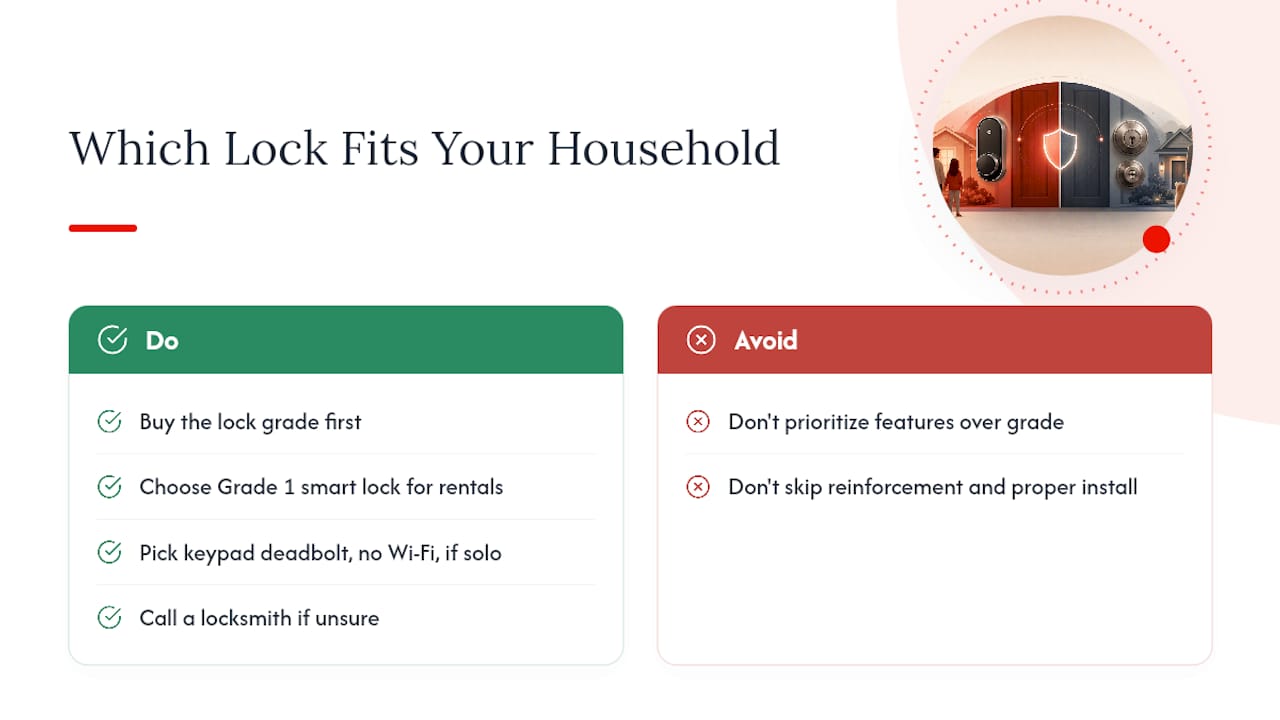
My read after weighing the evidence: buy the grade first, then decide if you need the smart features. A high-quality deadbolt reinforced with long screws beats a poorly installed smart lock every time, and the reverse is also true.
If you host guests, run a rental, or manage a large family with shifting schedules, a Grade 1 smart lock earns its premium through guest codes and logs. If you live alone or rarely hand out access to anyone, a keypad deadbolt without Wi-Fi gives you nearly the same daily convenience with less to maintain. Run through the checklist above, and call a locksmith if you’re unsure about your door’s compatibility.
— Julio Borroto
Sources
Recommended
Comments